
Brand Management

5 best franchise marketing software platforms in 2026

Picture a corporate marketing team running a brand across dozens or hundreds of locations. A franchisee in one city is running an off-brand flyer. Corporate is buried under one-off local requests it can’t keep up with, and the brand drifts a little more at every location.

That’s the real franchise marketing problem: the people creating content are franchisees and location managers, not marketers, and the brand breaks at the point of customer contact. General CRM or franchise management tools track leads and royalties, not brand execution.

Consistent brand presentation can lift revenue by up to 23%, according to a widely cited Lucidpress brand consistency study — and franchise networks have the most touchpoints to keep aligned. This guide compares 5 franchise marketing software platforms for marketing directors, brand managers, and CMOs.

5 best franchise marketing software platforms in 2026

These platforms are evaluated on how well they let franchisees create locally without breaking the rules a franchisor sets centrally for its franchise marketing software. The 5 below represent the category’s main approaches: templated content creation, franchise operations, social and reputation, local SEO, and co-op fund management.

Platform comparison overview

PlatformHQ / UK presenceBest forNotable UK customersPricing tier
PapirflyOn-brand local content creation at scaleTemplated Content Creation, DAM, brand portal, approvalsFranchisees self-serve on-brand assets, no designer needed$$$
FranConnectFull franchise operations with marketing built inMarketing automation, communication hub, compliance trackingDeep franchise-specific operations and compliance tooling$$–$$$
SOCiSocial, reputation, and local SEO at scaleGenius AI agents, review management, listings syncAI automation runs without local users logging in$$$$
UberallListings, local SEO, and reviews at scale125+ directory sync, review management, local pagesBroad, automated listings coverage$$$–$$$$
BrandMuscleBrand-compliant co-op and MDF fund managementCo-op/MDF management, ad builder, asset libraryTies local ad spend directly to brand compliance$$$$
Best for
Platform
Best for
Papirfly
On-brand local content creation at scale
FranConnect
Full franchise operations with marketing built in
SOCi
Social, reputation, and local SEO at scale
Uberall
Listings, local SEO, and reviews at scale
BrandMuscle
Brand-compliant co-op and MDF fund management
previous arrowprevious arrow
next arrownext arrow

1. Papirfly – Best for on-brand local content creation at scale

Best for: Franchise and multi-location brands that need local teams to produce their own on-brand marketing without central design support. Pricing: $$$

Papirfly combines Digital Asset Management, Templated Content Creation, a brand portal, and approval workflows in one suite. Franchisees build local materials from locked templates with no designer, and central teams set the guardrails once instead of fulfilling every request.

Enterprise customers including BMW, Mercedes-Benz, Goldman Sachs, IHG, and Mondelez run this model at scale, as well as multiple global brands operating a franchise network.

Key features:

  • Lockable, on-brand templates for non-designers
  • Centralized Digital Asset Management
  • Branded portal as a single source of truth
  • Usage analytics across locations

Pros:

  • Franchisees create on-brand content in minutes, no training needed
  • Only platform here combining DAM, brand portal, and templated production
  • Enterprise-proven at scale with brands like BMW and IHG

Cons:

  • Not a franchise CRM or royalty-management system
  • Value is clearest at multi-location scale

2. FranConnect – Best for full franchise operations with marketing built in

Best for: Franchisors that want lead management, royalties, and compliance in the same system as marketing. Pricing: $$–$$$

FranConnect is a franchise-specific operations platform used by more than 600 franchisors, with marketing sitting alongside sales, finance, and support. It covers multi-channel campaigns, a franchisee communication hub, and compliance tracking, built around franchise workflows like territory management. Its marketing tools are lighter than platforms built purely for content, and it has no dedicated template tool for franchisee-created local materials.

Key features:

  • Marketing automation across email, social, and events
  • Franchisee communication hub
  • Document and compliance management
  • Royalty tracking and multi-unit visibility

Pros:

  • One system for sales, operations, and marketing
  • Strong compliance and franchise agreement tracking
  • Deep franchise-specific workflows like territory management

Cons:

  • Marketing tools thinner than dedicated content platforms
  • No templated design tool for franchisee content

3. SOCi – Best for social, reputation, and local SEO at scale

Best for: Large multi-location brands managing hundreds or thousands of local social, review, and search profiles. Pricing: $$$$

SOCi’s Genius AI agents post, reply to reviews, and manage local listings automatically, so brands get consistent coverage even at locations that never log in. It’s built for social, reputation, and local search rather than producing the assets franchisees create, and it’s priced for franchise systems with 500 or more locations.

Key features:

  • AI-driven social posting and reply management
  • Automated review response and escalation
  • Local listings and Google Business Profile sync

Pros:

  • Runs automatically without franchisee logins
  • Strong at “near me” search visibility
  • Built for very large, complex location networks

Cons:

  • High cost relative to smaller franchise systems
  • Not a content-creation or DAM tool

4. Uberall – Best for listings, local SEO, and reviews across large footprints

Best for: Franchises that need every location’s listings and reviews accurate across dozens of directories. Pricing: $$$–$$$$

Uberall syncs business information across 125+ directories, including Google, Apple Maps, and Yelp, with centralized, decentralized, or collaborative models for local control. It requires a minimum of 25 locations and custom pricing, and it’s lighter on brand asset creation than platforms built around templated content.

Key features:

  • Sync across 125+ listing directories
  • Review management and response
  • Local pages and store locator

Pros:

  • Broad, automated listings coverage
  • Flexible governance models for franchise structures
  • Bulk updates cut manual location-by-location work

Cons:

  • No published pricing; requires 25+ locations
  • Limited tools for creating on-brand marketing assets

5. BrandMuscle – Best for brand-compliant co-op and MDF fund management

Best for: Franchisors managing co-op advertising funds and franchisee ad spend under brand rules. Pricing: $$$$

BrandMuscle centralizes ad design, asset management, co-op and MDF fund management, and reporting, with drag-and-drop tools for franchisees to build brand-compliant ads. It’s priced for larger franchise systems, starting around $4,500 per month, and its focus is local ad execution rather than the full range of content a franchise program needs.

Key features:

  • Co-op and MDF fund management
  • Drag-and-drop, brand-compliant ad builder
  • Centralized asset library and approvals

Pros:

  • Directly ties local ad spend to brand compliance
  • Established with Fortune 1000 franchise and dealer networks
  • AI-assisted ad copy speeds up local execution

Cons:

  • High starting price point
  • Narrower focus on paid ads than broader content creation

What is franchise marketing software?

Franchise marketing software is the platform layer that lets a franchisor control brand standards centrally while franchisees execute marketing locally. It brings together brand-controlled templates, a central asset library, local execution and listings, approval workflows, and multi-location reporting in one system.

It’s not a franchise CRM or operations platform, which tracks leads, royalties, and agreements, and it’s not a general marketing suite built for a single-location business. It’s specifically about the handoff between corporate brand control and franchisee-level execution.

Without it, franchisors typically manage consistency through PDFs, email chains, and one-off design requests — slow for franchisees and unsustainable for the central team. That gap is exactly what pushes teams toward franchise marketing shadow tools instead of approved channels.

Why franchise brands need dedicated marketing software

1. Keep the brand consistent at every location

Every location is a brand touchpoint, and inconsistency compounds across dozens or hundreds of them. Dedicated software enforces franchise brand consistency through locked templates rather than trust alone.

2. Let franchisees create their own on-brand content

Franchisees know their local market, but most aren’t designers. The right platform lets them build flyers, social posts, and local ads themselves from templates that keep the brand intact.

3. Take the load off the central team

Without self-serve tools, every local request lands on the central marketing team. Dedicated software shifts that team’s role from fulfilling requests to setting guardrails once.

4. Move faster with approvals and one source of truth

Scattered files and email approvals slow campaigns down and create version confusion. One platform with built-in approval workflows keeps everyone working from the same assets.

5. See what’s happening across the network

Franchisors need visibility into what’s actually published locally, not just what was approved centrally. Multi-location reporting surfaces adoption and gaps before they become brand problems.

Key features to look for in franchise marketing software

1. Lockable brand templates

Look for templates that let franchisees edit only permitted fields — text, local offers, store hours — while locking logos, colors, and layout.

2. Centralized digital asset management

A central digital asset management library ensures every location pulls from the same approved logos, photography, and assets, cutting down on outdated files circulating across the network.

3. Approval workflows and permission levels

Role-based permissions and approval steps let corporate decide what needs sign-off and what franchisees can publish directly, balancing speed with control.

4. Local SEO and listings management

Accurate, consistent listings across Google, Yelp, and other directories affect local foot traffic. Look for automated syncing rather than manual, location-by-location updates.

5. Multi-location reporting

Reporting should show usage and performance by location, not just in aggregate. For a broader view, see our comparison of Digital Asset Management platforms.

How to choose the right franchise marketing software

  1. Assess your current franchise marketing challenges. Document where brand consistency is breaking down and where the central team is most overloaded.
  2. Map who creates what. List every type of local content franchisees produce and decide what should stay locked, editable, or need approval.
  3. Check ease of use for non-marketers. Test the platform with an actual franchisee, not just your marketing team.
  4. Evaluate integrations. Confirm the platform connects to your existing website, CRM, and listings tools.
  5. Calculate total cost of ownership. Add licensing, onboarding, and training costs across every location, not just the subscription price.

Get started with Papirfly

Every franchise marketing program needs the same three things: a clear split between what’s controlled centrally and what’s left to franchisees, tools that make on-brand content easy to create at every location, and data to see how the brand is performing across the network.

If you’re evaluating platforms to solve exactly this problem, Papirfly is worth a closer look, built around templated content creation, a central asset library, and a brand portal that gives franchisees the freedom to act quickly while corporate keeps control.ance and local content production, the Papirfly Suite is worth a closer look.

See franchise marketing software in action

Ready to see what’s possible for your network?

See franchise marketing software in action

Ready to see what’s possible for your network?

Ready to see what’s possible for your network?

Multilingual marketing assets localized for global teams using templated content creation.

Frequently asked questions about franchise marketing software

What features should franchise marketing software have?

Look for lockable brand templates, centralized digital asset management, approval workflows with permission levels, local SEO and listings management, and multi-location reporting — together, these let franchisees execute locally while corporate keeps control.

How much does franchise marketing software cost?

Pricing varies widely by scale, from a few hundred dollars a month for SMB-style tools to tens of thousands a year for enterprise platforms covering hundreds of locations. Most vendors price by location count, seats, or custom quote.

How does franchise marketing software keep the brand consistent across locations?

It locks core brand elements — logos, colors, layouts — inside templates so franchisees can only edit approved fields like local offers. Combined with a central asset library and approvals, this prevents off-brand materials locally.

What’s the best franchise marketing software?

It depends on your priority: Papirfly leads for templated, on-brand content creation, FranConnect for full franchise operations, and SOCi or Uberall for social, reputation, and local SEO. Match the platform to your problem first.

Digital Asset Management

What is an AI brand assistant and why does your brand portal need one?

Local teams aren’t ignoring your brand guidelines because they don’t care. They’re ignoring them because finding the right answer takes too long.

When a regional marketing manager needs a hex code or a headline font rule, they’re not spending four minutes clicking through a portal page hierarchy. They’re using what they already know and moving on. The off-brand output that follows isn’t a people problem. It’s a friction problem.

AI brand assistants are changing this. Here’s what that means for how brand portals need to work in 2026 — and what it means for your brand’s visibility beyond your own website.

Why your brand portal doesn’t get used

A brand portal solves the storage problem. Assets are no longer scattered across shared drives and email threads. There’s one place for logos, fonts, campaign materials, and brand rules.

But centralised storage and active adoption are different things.

Employees default to fast and familiar — even when those tools produce off-brand results. The barrier isn’t knowing the portal exists. It’s the time cost of finding a specific answer within it. When the on-brand option is slower than guessing, most people guess.

This is why off-brand content keeps appearing in the market even at organisations with well-maintained portals.

What an AI brand assistant does

An AI brand assistant is a chat interface embedded directly inside your brand portal. Users type a question in plain language and get an immediate, sourced answer — with a link to the relevant guideline page.

What font do we use for headlines? What are our primary brand colours? Can I use the logo on a dark background?

No navigation required. No knowledge of the portal structure needed.

This matters because it removes the expertise barrier entirely. A new franchisee, a regional sales rep, a freelance designer — all can get the right answer on the first attempt. When the on-brand answer is faster than guessing, behaviour changes.

It also changes what a brand portal is. Not a content repository. An active system that helps teams apply the brand, not just view it.

Product Tour Guide

To try the Product Tour Guide DEMO, please switch to desktop mode.

Who benefits most from an AI brand assistant?

The teams that see the biggest change are distributed ones — local markets, franchise networks, regional offices — where brand knowledge is inconsistent and central teams spend a disproportionate amount of time fielding requests they shouldn’t need to answer manually.

According to Forrester’s State of Business Buying 2026, GenAI search is now the top discovery channel at the consideration stage — ahead of vendor websites, social media, and industry publications. That statistic matters for more than just how buyers find you. It matters for what they find when they do.

Brand guidelines and AI search: the connection most teams miss

AI discovery tools — ChatGPT, Perplexity, Gemini — are shaped by what they’ve been trained on. Every off-brand asset, every inconsistent logo usage, every unofficial brand interpretation that circulates online feeds that training data. Brands with inconsistent output get represented inconsistently by AI. That misrepresentation can persist for a long time after the source materials have been corrected.

Keeping brand guidelines accessible and followed is no longer just a consistency question. It directly affects how your brand is represented in the discovery layer where your buyers now start their research.

The permissions gap that breaks brand integrity

One risk that rarely surfaces until it’s already a problem: in portals where local editors have page-level access, those users can sometimes edit shared site components — navigation, headers, footers — that affect the entire portal, not just the page they were working on.

The fix is straightforward: separate page-level editing rights from control over global components. Local editors manage their own content areas. Central brand integrity stays intact. For multi-market or franchise organisations, this distinction is operationally critical.

What a brand portal should be able to do in 2026

Five questions worth asking about your current setup:

  1. Can any employee — regardless of how often they use the portal — get a brand answer in under 30 seconds?
  2. Does your portal surface the right answer, or does it require users to already know where to look?
  3. Are local teams still sending requests to your central brand team for information that should be self-serve?
  4. Do your portal permissions prevent local editors from accidentally changing site‑wide components?
  5. Do you have visibility into which guidelines are being accessed, and by which markets?

If question three is a regular occurrence, your portal is functioning as a helpdesk. That’s a workflow problem, not a content problem.

The AI brand assistant

Brand portals work when people use them. People use them when they’re faster than the alternative. An AI brand assistant closes that gap.

Turning passive brand guidelines into something teams can actually query in real time, and combined with proper governance controls and integration into DAM and content creation workflows, an ai brand assistant is the difference between a portal that stores your brand and one that actively protects it.

AI brand assistant answering a question about brand colors using approved brand guidelines inside a brand portal.

See how Papirfly’s brand portal works

Built for teams managing brand at scale.

See how Papirfly’s brand portal works

Built for teams managing brand at scale.

Built for teams managing brand at scale.

Custom brand portal interface surfacing legacy assets to showcase brand heritage interactively

FAQs

What is an AI brand assistant in a brand portal?

An AI brand assistant lets users ask plain language questions about brand guidelines — fonts, colours, tone of voice, logo rules — and get immediate answers with a source link. It removes the need to navigate manually through portal pages to find specific information.

Why do employees ignore brand guidelines?

The most common reason is friction. When finding the right answer in a portal takes longer than guessing or using a familiar tool, most people default to what’s fastest — even if that produces off-brand results.

How does brand consistency affect AI search visibility?

AI tools like ChatGPT and Perplexity are trained on publicly available content. Off-brand assets and inconsistent brand representations that circulate online can be incorporated into that training data, causing AI to represent your brand inaccurately — sometimes for months after the issue has been corrected internally.

What’s the difference between a brand portal and a DAM?

A DAM stores and organises digital files at scale, with metadata, governance, and distribution capabilities. A brand portal presents assets and guidelines in a curated, user-facing environment with a branded experience. The two are complementary — most enterprise setups use both, integrated within the same workflow.

What user permissions should a brand portal have?

Local editors should be able to manage their own content areas without the ability to edit global components — navigation, headers, footers — that affect the entire portal. Separating page-level editing rights from site-wide control is the standard for distributed or multi-market organizations.

Brand Management

The complete guide to franchise marketing in 2026

Every franchise brand faces a version of the same problem. The brand lives across dozens, hundreds, or thousands of locations – each run by a different operator, in a different market, with different resources and different local competitors. When those locations market inconsistently – different colors, different tone, different offers – customers notice. And the brand erodes.

This guide covers franchise marketing end-to-end: what it is, why it’s structurally different from regular marketing, the strategies that work, the channels that matter, and the tools that make it manageable at scale. Whether you’re building a franchise marketing program from scratch or tightening up one that’s grown beyond control, this is the reference you need.

What is franchise marketing?

Franchise marketing is the combined effort to promote a brand nationally while driving performance at the local level. It is not one thing – it operates across three distinct layers that most franchise networks manage simultaneously.

Franchisor brand marketing sets the national or global brand position. It builds awareness, runs brand campaigns, defines the identity that all other marketing must reflect. This layer is owned centrally and sets the standard everyone else follows.

Franchise development marketing targets prospective franchisees. Its job is to attract the right operators to join the network – so the audience here is investors and entrepreneurs evaluating the franchise opportunity, not end consumers.

Local store marketing is what most franchisees care about most. It is the day-to-day promotional activity at location level: the flyers, social posts, Google Business Profile updates, local offers, and community-facing content that drives foot traffic and repeat custom.

Each layer has a different audience, a different goal, and a different owner. The challenge is that they all need to feel like the same brand. (Source: INSERT SOURCE)

The core franchise marketing challenge: Consistency vs. local relevance

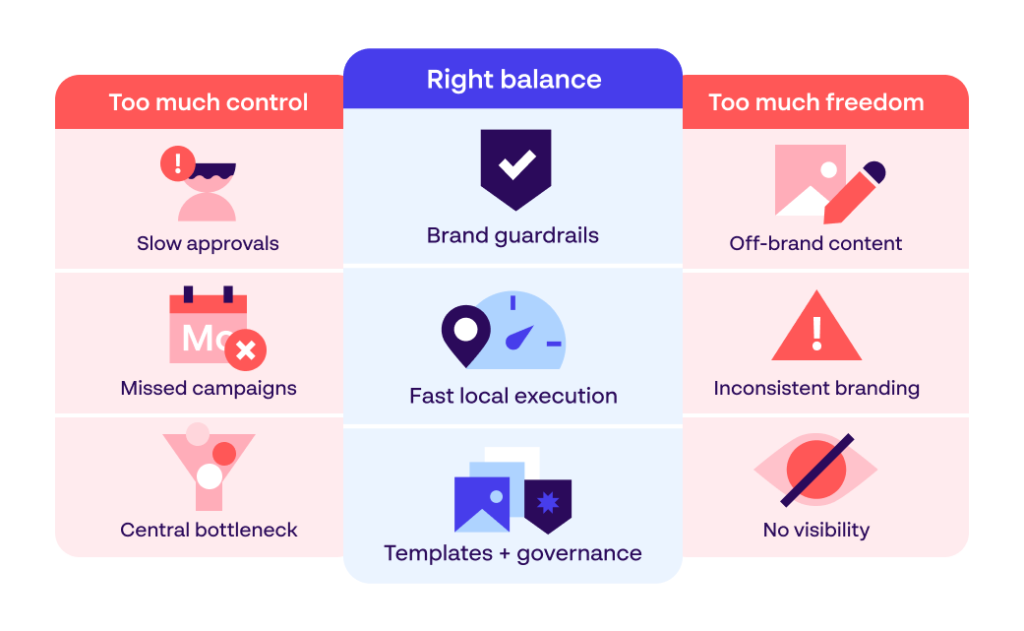
The structural tension in franchise marketing is not a failure of execution – it is a feature of the model. Corporate teams want brand standards protected. Franchisees want to run local promotions, respond to local events, and speak to their own community in their own voice.

Neither position is wrong. The brand exists to be consistent enough that customers trust it everywhere they encounter it. But markets differ. A promotion that works in a city center does not necessarily work in a suburban location. A tone that resonates in one region can feel off in another.

Smart templates helping local teams create consistent franchise marketing materials with approved brand assets.

The goal is not to pick a side. The goal is to build a system that makes it easy to be on-brand.

What brand inconsistency actually costs

When franchisees go off-brand – using unofficial colors, running unapproved promotions, creating their own materials from scratch – the damage is not always visible immediately. But it accumulates.

Brand recognition weakens when customers see different visual identities at different locations. Trust erodes when messaging is contradictory. And the central marketing team absorbs the cost: time spent chasing down rogue content, re-shooting assets that exist but can’t be found, managing complaints that stem from a franchisee doing something the brand would never have approved. Research by Lucidpress found that consistent brand presentation can increase revenue by up to 23% (Source: Lucidpress, Brand Consistency Report).

What over‑centralizing costs

The opposite failure is equally damaging, just less obvious. When central teams try to control every piece of local marketing output – requiring every social post, every flyer, every in-store promotion to pass through HQ for approval – they create a bottleneck that kills local momentum.

Franchisees stop asking for help and start improvising. They use Canva, pull images from Google, and write their own copy. The central team calls it “shadow marketing” – and it is almost always worse than what would have happened with a faster, more accessible governed system. Over-centralization also burns out the central team. Spending 50% of marketing capacity on low-value adaptation requests is not a brand governance strategy – it is a resource failure.

6 franchise marketing strategies that work

The following strategies address both sides of the tension. They give the central team control over what matters most and give franchisees the freedom to execute quickly within those boundaries.

1. Turn brand guidelines into usable tools

A PDF brand book does not govern a franchise network. It sits in a folder, goes unread, and gets ignored the moment a franchisee is under time pressure. Brand guidelines need to be accessible, searchable, and built into the tools franchisees already use – not delivered as a document and hoped for.

Effective franchise brands publish their guidelines through a brand portal: a single, always-current home for logos, colors, tone of voice rules, approved imagery, and campaign context. When the guidelines are easy to find and easy to apply, compliance becomes the path of least resistance.

Search interface helping franchise marketing teams find approved brand assets with filters for images and categories.

2. Build a scalable template system

Templates are the single most effective tool for scaling on-brand local content creation. A well-designed template locks the non-negotiable elements – logo placement, color palette, approved font – and opens the editable fields: local address, local offer, local image slot.

The result is that a franchisee with no design skills can produce a professional, fully on-brand flyer in under two minutes. No agency request. No HQ approval needed. No risk of going off-brand because the template makes it structurally impossible. Platforms like Papirfly’s Templated Content Creation solution make this possible across print, social, email, and digital formats from a single interface.

3. Centralize your asset library

Inconsistent creative often has a simple root cause: franchisees cannot find the approved assets, so they use whatever they can find. A centralized Digital Asset Management (DAM) system solves this at the source.

When every approved logo version, every campaign image, every co-op creative, and every seasonal asset lives in one searchable, rights-managed library – and when franchisees have role-appropriate access to exactly what they need – the “I couldn’t find it” excuse disappears. Asset centralization also eliminates redundant production. If the asset exists and can be found, there is no need to recreate it.

4. Define the local marketing playbook

Franchisees should not have to guess what they are allowed to do locally. A clear, practical local marketing playbook defines the rules of engagement: which channels they are responsible for, what pre-approved content they can use, what requires approval, and what is off-limits.

The playbook reduces the volume of ad hoc requests reaching the central team and gives franchisees genuine confidence to act. It works best when it is structured around real scenarios – “here’s what to do for a grand opening,” “here’s how to run a local social campaign” – rather than written as a compliance document. (Source: INSERT SOURCE)

5. Create a fast approval process

Not everything can be templatized. Franchisees will always have local needs that require custom content – a community event, a local partnership, a regional promotion. The question is how quickly and reliably those requests get handled.

A slow approval process is not neutral. It trains franchisees to stop asking and start improvising. A good approval workflow is structured, tracked, and fast – with clear SLAs, clear feedback when something is not approved, and a clear escalation path. Built-in approval workflows within the content platform, rather than email chains, are significantly faster and more auditable.

6. Measure and learn across locations

Franchise marketing generates a large volume of data across a large number of locations. Most franchise brands do not use it well. Asset usage rates, local campaign performance, and template adoption by location are all signals that tell the central team which markets are engaged, which are struggling, and where the brand is most at risk.

Analytics dashboards that aggregate performance across the network give the central team visibility they cannot get from individual check-ins. Over time, this data informs which templates get updated, which guidelines need clarification, and which markets need additional support.

Digital Asset Management platform organizing restaurant brand assets for franchise marketing across multiple locations.

5 key franchise marketing channels

Franchise brands typically need both a national layer and a local layer for most channels. The national layer builds awareness and sets the brand; the local layer drives conversion and community connection.

1. National brand campaigns

National campaigns – TV, out-of-home, digital display, paid social – are owned and funded by the franchisor. They build category awareness and reinforce brand identity at scale. Franchisees benefit directly from national campaigns even if they play no role in creating them.

2. Local SEO and Google Business Profile

Every franchise location needs its own optimized Google Business Profile. Inconsistent NAP (name, address, phone) information, missing opening hours, or outdated photos are direct conversion failures. Local SEO is one of the highest-ROI investments a franchise network can make at location level – and one of the most commonly neglected. (Source: BrightLocal, Local Consumer Review Survey)

3. Social media

Social media operates best as a hybrid. The central team manages the brand account and publishes national content. Franchisees manage local accounts – but with guardrails. Pre-approved post templates, approved image libraries, and clear tone guidance enable local social activity that stays on-brand without requiring individual HQ approval for every post.

4. Paid media and co‑op programs

Co-op advertising programs pool franchisee contributions into a shared media budget, allowing for more effective local spend than individual locations could achieve independently. The central team typically manages the creative and media strategy; franchisees benefit from the buying power. Clear rules about what is covered, what requires top-up funding, and how performance is reported are essential for co-op programs to function well.

5. Email and CRM

Email remains one of the highest-performing channels for franchise marketing – both for customer retention at location level and for re-engagement campaigns run centrally. Centrally managed templates allow local customization (location name, local offer, local event) without compromising deliverability or brand consistency.

Conclusion

Franchise marketing works when it solves the right problem: not choosing between brand control and local freedom, but building the systems that make both possible at the same time. The strategies and channels in this guide are each individually valuable. But they work best when they are connected – when the asset library feeds the templates, the templates flow through the brand portal, and the portal gives every franchisee a single, reliable place to start.

Getting this right is not a creative challenge. It is a systems and governance challenge. The franchise brands that scale without brand erosion are the ones that invest in infrastructure early – before the network grows beyond the capacity of the central team to manage it manually.

Papirfly is built specifically for this problem. The franchise marketing software combines Templated Content Creation, brand portal, and Digital Asset Management into one platform – so every location has everything it needs to market locally and stay on-brand automatically.

Give every location the tools to stay on‑brand

See how Papirfly powers franchise marketing at scale.

Give every location the tools
to stay on‑brand

See how Papirfly powers
franchise marketing at scale.

See how Papirfly powers franchise marketing at scale.

FAQs

How do you maintain brand consistency across franchise locations?

Brand consistency in franchise networks requires more than a brand book. It needs centralized asset libraries, pre-approved content templates with locked brand elements, and a brand portal that gives every location a single source of truth. When the right tools are in place, on-brand execution becomes the easiest path – not a compliance exercise.

What is the difference between national and local franchise marketing?

National franchise marketing is owned by the franchisor and focuses on building brand awareness and driving system-wide growth. Local franchise marketing is owned or co-owned by individual franchisees and focuses on driving traffic and conversion at location level. The two layers need to be coordinated: national campaigns set the brand context; local activity converts it into sales.

What software do franchise brands use for marketing?

The most effective franchise marketing platforms combine three core capabilities: Templated Content Creation (so local teams can produce on-brand materials without a designer), centralized Digital Asset Management (so approved assets are always findable), and a brand portal (so guidelines, campaigns, and assets have a single governed home). Papirfly combines all three in one platform built for multi-location brand governance.

What is the biggest franchise marketing mistake brands make?

Over-centralizing. When every piece of local content requires HQ approval, franchisees stop asking and start improvising – using unapproved tools, unofficial assets, and off-brand messaging. The fix is not less control; it is better-designed guardrails that make on-brand execution faster and easier than going rogue.

How do franchise brands balance brand standards with local marketing needs?

The most effective approach is structured flexibility. Central teams define what cannot change – logo, core colors, approved imagery, brand voice – and build templates that lock those elements. Franchisees control what should change locally: the offer, the location details, the local imagery. This gives every location genuine creative latitude within a defined brand framework. See also: Franchise brand consistency.

Digital Asset Management

AI in Content Operations: Why operational maturity is the real differentiator

AI is no longer experimental. It is operational.

That is one of the clearest findings from Kristina Huddart’s latest report, 2026 State of AI in DAM and Content Operations. Nearly 80% of organizations are already using AI within their business operations, but only 54% say they are successful with it.

For me, that gap is the real story — and it reflects something I am seeing play out across the market right now. The hype is giving way to harder questions about measurable value and tangible results. Enthusiasm alone is no longer enough.

As Product Director at Papirfly, I speak with marketing and brand teams every week who are under pressure to scale content faster, localize campaigns, and maintain brand consistency across more channels than ever before. But the organizations seeing meaningful results are not simply adopting AI tools. They are building AI-ready content operations — with strong foundations, quality data, and clear internal policies in place before AI ever enters the picture.

That distinction matters.

Why AI adoption isn’t the same as AI content success

One of the strongest themes in the report is the shift from enthusiasm to operational reality.

In 2024, most organizations were still experimenting with AI. By 2026, 79% are actively using it. But widespread usage has also exposed a difficult truth: many businesses are not structurally prepared for AI at scale.

of organizations actively use AI in business

of organizations actively use AI in business

I think part of the problem is that organizations are moving from pure experimentation toward AI adoption without clear intent. Leaders need to be asking what specific pain points they are solving and what return on investment looks like — not simply applying AI to every process because it is available.

AI can accelerate content creation, metadata tagging, search, and workflow automation. But when organizations lack clean metadata, connected systems, approval structures, or governance, AI simply amplifies operational chaos faster.

Organizations with fully embedded AI are achieving 77% success rates, while those still experimenting report only 35% success. The difference is not access to AI tools. The difference is operational maturity.

How DAM becomes the foundation for scalable AI workflows

AI in content operations does not live in one platform. Modern marketing ecosystems are deeply interconnected, spanning DAM systems, campaign management tools, CMS platforms, localization workflows, and creative production environments. AI operates across that entire stack.

The challenge is that 48% of organizations are still using standalone AI tools with no integration into their core systems. That creates short-term outputs, but not scalable operational outcomes.

This is where Digital Asset Management software becomes far more strategic than many organizations initially realize. A modern DAM is no longer just a storage system — it is the operational foundation for AI-ready content operations. And the quality of data within it matters enormously. In our own testing, generic or overly broad metadata significantly reduces the relevancy of AI search results, while specific, niche metadata improves the machine’s ability to interpret and match content accurately.

That means investing in:

  • Centralized asset governance
  • Consistent, specific metadata structures
  • Approval and workflow management
  • Controlled brand access across regions and teams
  • Searchable, AI-enriched content libraries
  • Integration between DAM, campaign workflows, and content creation

These are operational requirements — not optional enhancements.

Where AI is delivering real results in DAM today

The strongest AI results are happening in operational workflows: metadata tagging and enrichment, workflow automation, search and discovery, and content creation support.

of organizations report productivity and efficiency gains from AI

of organizations report productivity and efficiency gains from AI

But I think the more interesting shift is in how DAM itself is evolving. It is moving from a place of record to a place of action. Rather than requiring teams to manually search through vast content libraries, AI should be acting as a creative partner — suggesting relevant assets, checking for brand consistency, and prompting users during the creation process. That is the direction we are building toward at Papirfly.

For global organizations managing large volumes of localized content, this matters even more. The goal is to empower local teams to move quickly while governance and brand consistency are maintained automatically — not manually policed.

The biggest challenge is not AI. It is trust.

Metadata quality, governance, integration complexity, and unclear ownership all point toward the same issue: organizations do not yet fully trust their AI content operations software.

That hesitation is understandable — and it mirrors something we have seen before. When the industry pushed hard to become “data-driven,” many companies had the ambition but not the trust in their own data infrastructure to act on it confidently. AI adoption is following the same pattern.

AI systems are only as reliable as the operational structures behind them. Poor metadata leads to poor recommendations. Weak governance increases compliance risk. Disconnected workflows create inconsistency. Organizations need clear standards around asset ownership, metadata consistency, workflow approvals, brand governance, AI usage policies, and user access controls.

AI cannot create operational clarity on its own. It depends on it.t is exposing the strengths and weaknesses already there in your content operations.

What do AI‑ready content operations actually look like?

Kristina Huddart’s report is refreshingly practical. And its core finding aligns with what I believe: the organizations that succeed with AI will not necessarily be the ones with the most tools. They will be the ones that have done the harder, less glamorous work of building strong operational foundations.

That also means being intentional about what you finish, not just what you start. AI makes it easier than ever to prototype and spin up new initiatives — but teams that chase every capability risk ending up overwhelmed and underdelivering. The focus has to be on completing what actually delivers value.

AI is not replacing content operations. It is exposing which organizations have built content operations capable of scaling into the future.

See how Papirfly supports AI‑ready content operations

Connected DAM, governance, and scalable workflows.

See how Papirfly supports AI‑ready content operations

Connected DAM, governance, and scalable workflows.

Connected DAM, governance, and scalable workflows.

AI-powered DAM graphic

FAQs

What is AI in content operations?

AI in content operations refers to the use of artificial intelligence to automate, enhance, and scale the processes involved in creating, managing, and distributing content. This includes tasks like metadata tagging, workflow automation, search and discovery, and content creation support.

Why are so many organizations struggling to get results from AI?

Widespread AI adoption has exposed a gap between using AI tools and being operationally ready for them. Organizations without clean metadata, connected systems, or strong governance find that AI amplifies existing inefficiencies rather than solving them.

How does a DAM system support AI content workflows?

A modern DAM acts as the operational foundation for AI-ready content operations. It centralizes assets, structures metadata, governs usage rights, and connects workflows — giving AI the clean, organized environment it needs to deliver consistent results.

What does AI-ready content governance look like?

AI-ready governance includes clear standards around asset ownership, metadata consistency, workflow approvals, brand guidelines, AI usage policies, and user access controls. Without these structures in place, AI outputs become unreliable and difficult to scale.

What’s the difference between using AI tools and having an AI-ready content operation?

Using AI tools means adding AI capabilities to existing workflows. An AI-ready content operation means the underlying systems — DAM, metadata, governance, integrations — are structured to support AI at scale. The first creates isolated outputs; the second creates sustainable operational outcomes.

Digital Asset Management

The 7 Best DAM Software for UK Enterprises in 2026

Assets scattered across SharePoint, agency Dropbox links, and a half-used DAM trial. Regional teams reusing outdated logos. Brand managers chasing approvals. A growing fear of a UK GDPR or rights issue with consumer imagery. This is the default state for UK marketing and brand teams without a governed Digital Asset Management platform.

UK buyers evaluating DAM in 2026 want vendors with UK customers, UK-based support, and a proven track record with UK compliance. This guide compares 7 platforms that meet that bar.

The 7 best Digital Asset Management software for UK enterprises

We selected platforms based on UK customer footprint, governance and rights management strength, integration depth, and fitness for multi-market operations. Papirfly’s Digital Asset Management solution leads the list.

Platform comparison overview

PlatformHQ / UK presenceBest forNotable UK customersPricing tier
PapirflyOslo / UK enterprise customer baseUK enterprises scaling brand and content operationsSSE, Vodafone, IBM UK$$$–$$$$
Asset BankBrighton, UK (HQ)Mid‑market UK teams needing compliance‑first DAMUK charities, higher education, regulated sectors$$–$$$
BynderAmsterdam / UK officeGlobal UK enterprises with large creative librariesPUMA, Carlsberg, Five Guys UK$$$–$$$$
Third Light (Chorus)Cambridge, UK (HQ)Marketing and creative teams needing collaborative DAMOxford University, Diabetes UK$$–$$$
BrandworkzLondon, UK (HQ)Enterprises combining DAM with brand portal and templatesDesign Council, mid-size UK brands$$$–$$$$
ResourceSpaceOxfordshire, UK (HQ)Cost-conscious organisations and not‑for‑profitsCoca-Cola, UK charities, universities$–$$
FrontifySt. Gallen / UK marketBrand teams building a unified brand guidelines hubDyson, Lufthansa, UK agencies$$$–$$$$
HQ / UK presence
Platform
HQ / UK presence
Papirfly
Oslo / UK enterprise customer base
Asset Bank
Brighton, UK (HQ)
Bynder
Amsterdam / UK office
Third Light (Chorus)
Cambridge, UK (HQ)
Brandworkz
London, UK (HQ)
ResourceSpace
Oxfordshire, UK (HQ)
Frontify
St. Gallen / UK market
previous arrowprevious arrow
next arrownext arrow

1. Papirfly – Best for UK enterprises scaling brand and content operations

Best for: UK and multi-region enterprises needing centralised brand control with local execution at scale.

Pricing: $$$-$$$$

Papirfly combines Digital Asset Management, a Brand Portal, and Templated Content Creation in one integrated suite — the only platform in this list to do so. Trusted by SSE, Vodafone, and IBM UK, the platform’s DAM is cloud-native on AWS with AI-powered auto-tagging at ingestion, semantic search, and bidirectional PIM and ERP integration. Rights and lifecycle management are built in, with GDPR-ready controls and ISO 27001 and SOC 2 Type II certification. Where most DAM vendors require separate tools for brand guidelines and local content production, Papirfly handles both within the same environment.

Strengths: Integrated DAM, Brand Portal, and Templated Content Creation; proven UK enterprise references; AI brand compliance checker; strong governance for regulated and multi-market organisations.

Limitations: Implementation scope for complex multi-brand deployments requires dedicated resource; depth of suite may exceed the needs of smaller teams.

2. Asset Bank – Best UK‑headquartered DAM for mid‑market brands

Best for: Mid-market UK organisations in regulated sectors, higher education, and charities needing a compliance-first DAM with UK-based support.

Pricing: $$–$$$

Brighton-based Asset Bank has built a strong reputation among UK buyers where compliance is the primary requirement. Granular permission controls, usage rights tracking, expiry alerts, and explicit UK GDPR consent records are available out of the box. Its UK-based support team is consistently cited as a differentiator. For brands needing local content production or deep ERP and PIM integration alongside their DAM, additional tooling will be required.

Strengths: UK-headquartered; GDPR consent management built in; competitive mid-market pricing; highly regarded UK support.

Limitations: No templated content creation; limited enterprise ERP and PIM integration depth.

3. Bynder – Best for global UK enterprises with large creative libraries

Best for: Global UK enterprises with large creative teams needing AI-powered DAM, automated approval workflows, and broad MarTech integration.

Pricing: $$$–$$$$

Bynder is one of the most recognised DAM platforms globally, with a meaningful UK presence. Its automated multi-stage approval workflows, dynamic asset transformation, and broad integration library — covering Adobe Creative Cloud, Salesforce, and HubSpot — make it a natural fit for high-volume creative organisations. It does not offer integrated templated content creation for local market production, and implementation complexity is high without dedicated DAM resource.

Strengths: Market-leading brand recognition; strong workflow automation; broad MarTech integrations.

Limitations: No integrated local content production; high implementation complexity; minimum contract size excludes mid-market.

See why Papirfly is the best Bynder alternative.

4. Third Light Chorus – Best UK-built DAM for marketing and creative teams

Best for: UK mid-market marketing and creative teams needing collaborative DAM with straightforward deployment and value-for-money cloud hosting.

Pricing: $$–$$$

Cambridge-based Third Light has served a global customer base for over two decades. Its Chorus platform is built for team collaboration — syncing project folders to local storage, managing assets in the cloud, and providing creative review tools that integrate with existing workflows. Deployment is straightforward and pricing is transparent. As a small vendor, product development pace and enterprise governance depth reflect the team’s scale.

Strengths: UK-headquartered; strong deployment simplicity; flexible cloud or on-premise hosting; excellent support reputation.

Limitations: Limited AI-powered search; not suited to complex multi-brand enterprise governance.

5. Brandworkz – Best for London-based brand management and DAM combined

Best for: UK mid-market enterprises wanting a single platform combining DAM, brand guidelines, dynamic templates, and approval workflows.

Pricing: $$$–$$$$

London-headquartered Brandworkz sits at the intersection of DAM and brand management. Dynamic InDesign templates, a logo finder, approval workflows, and AI-driven brand compliance checking are all integrated with asset storage. The interface is consistently praised for clarity and ease of use. At enterprise scale — large asset libraries, complex multi-region governance, deep ERP integration — the platform’s mid-market positioning begins to show.

Strengths: London-based; intuitive interface; templates and brand guidelines integrated with DAM; useful middle-market positioning.

Limitations: Infrastructure limits suitability for large enterprise libraries; less depth in ERP and PIM integration.

6. ResourceSpace – Best open-source DAM for cost-conscious UK organisations

Best for: UK charities, universities, not-for-profits, and cost-sensitive teams that need capable DAM without enterprise-tier pricing.

Pricing: $–$$

Developed by Oxfordshire-based Montala, ResourceSpace is the leading open-source DAM, trusted by over 250,000 users including Coca-Cola and Google. No software licence fee means organisations pay only for hosting and support. UK-hosted infrastructure runs from London’s Docklands. The open-source model requires internal technical resource for customisation, and the platform is not suited to complex enterprise governance or multi-brand distribution requirements.

Strengths: No licence fee; unlimited users; UK-hosted with strong data residency credentials; strong support despite open-source model.

Limitations: Interface lags behind commercial platforms; limited AI search and auto-tagging; not suited to enterprise governance at scale.

7. Frontify – Best for brand teams building a unified brand guidelines hub

Best for: Brand and marketing teams wanting a visually polished brand hub combining digital brand guidelines and asset management.

Pricing: $$$–$$$$

Frontify is best known for its brand guideline portal — a customisable environment where brand standards, asset libraries, and creative resources coexist. Customers include Dyson and a growing number of UK agencies. Its Figma and Adobe integrations support modern design workflows well. DAM capability is solid for brand portal use cases but less developed as a standalone enterprise asset management system for large volumes or complex rights management.

Strengths: Best-in-class brand guidelines presentation; strong Figma integration; growing UK agency adoption.

Limitations: DAM capability limited for large enterprise asset volumes; rights management less developed than compliance-first platforms.

See why Papirfly is the best alternative to Frontify.

How SSE used Papirfly to launch a new, unified brand

SSE, the FTSE-100 UK energy supplier, used Papirfly to roll out a new unified brand identity across SSE Group and its regulated electricity networks business. With a centralised brand hub and pre-approved templates, SSE empowered teams across the UK and Ireland to create on-brand content remotely, securing consistency without burdening central teams.

Read the full SSE brand story.

Why UK businesses need Digital Asset Management software

1. Asset management eliminates the cost of content chaos

Assets scattered across SharePoint, agency folders, and email attachments — with no consistent metadata or version control — force teams to recreate content that already exists. A single searchable DAM repository eliminates that cost. For UK enterprises managing large volumes of campaign and brand content, this is the foundational business case.

2. UK GDPR and rights compliance requires controlled distribution

Consumer imagery requires explicit consent records and expiry tracking. Licensed assets require usage rights documentation. Enterprise DAM platforms with built-in rights management enforce compliance at the point of access — expiry alerts fire before licences lapse, and audit logs capture every download and distribution event.

3. Templated content creation reduces localisation costs

UK enterprises running campaigns across multiple markets face a structural cost problem: central teams adapt content for local markets, or local teams produce off-brand materials independently. Templated Content Creation resolves this by enabling local teams to produce on-brand content from pre-approved templates, with locked brand elements. Explore the best AI DAM software to see how AI is accelerating this capability.

Key features to look for in DAM software for UK enterprises

1. UK GDPR-ready rights and consent management

Consent records must be attachable at asset level, with expiry dates that trigger alerts before licences lapse and a full audit trail of access and distribution. For UK organisations managing consumer imagery or licensed stock, this is non-negotiable during evaluation.

2. AI-powered metadata and semantic search

AI auto-tagging at ingestion is the difference between a searchable library and a growing pile. Assess whether the platform tags assets on upload and whether semantic search allows teams to find assets by describing them — not by entering exact file names.

3. Enterprise security and data residency

ISO 27001 and SOC 2 Type II certification are the baseline enterprise security credentials to verify. For UK organisations with data residency requirements, confirm where the platform hosts data and whether SAML 2.0 SSO, MFA, and role-based access controls are available as standard.

How to choose the right DAM software for your UK business

  1. Map your current asset chaos and pain points. Document where assets live today, how they are tagged, and what the most common failure modes are — rights lapses, off-brand materials, redundant recreations.
  2. Define your UK-specific compliance requirements. Establish UK GDPR, rights management, ISO certification, and data residency requirements before shortlisting — these can disqualify platforms before capability evaluation begins.
  3. Shortlist vendors with a verifiable UK footprint. Prioritise platforms with named UK enterprise references, UK-based support, and a track record with UK compliance requirements.
  4. Evaluate integration depth with your existing tech stack. Validate each shortlisted platform’s specific connectors with your PIM, ERP, CMS, and creative tools against your actual requirements.
  5. Calculate total cost of ownership in GBP. Add licence fees, implementation, integration, training, and ongoing administration — and account for the cost of tools the DAM replaces.

Get started with Papirfly: DAM trusted by UK enterprises

UK buyers should shortlist DAM vendors with UK customers, UK support, and clear UK GDPR readiness. The platforms above meet that bar at their respective tiers — the right choice depends on scale, governance needs, and existing tech stack. For UK enterprises that need DAM combined with brand governance and local content production, the Papirfly Suite is worth a closer look.

See Papirfly in action

Ready to see what end‑to‑end brand governance looks like across your markets?

See Papirfly in action

Take complete control of your content.

Take complete control of your content.

Frequently asked questions about DAM software in the UK

What is Digital Asset Management (DAM) software?

DAM software is a platform for storing, organizing, governing, and distributing digital brand assets from a single controlled environment. It replaces fragmented shared drives with structured metadata, rights management, and governed distribution. The Digital Asset Management guide covers the full scope.

Is DAM software UK GDPR-compliant?

Leading platforms include built-in UK GDPR controls — consent records at asset level, expiry alerts, and access audit logs. Compliance quality varies by vendor. Verify ISO 27001 certification, data residency options, and explicit consent tracking during evaluation rather than assuming compliance is standard.

What is the difference between DAM and a CMS?

A CMS publishes content to a website. A DAM manages the lifecycle of the assets that feed that content — storage, rights, version control, and governed distribution. Most enterprises use both: a DAM as the asset source of truth and a CMS as the publishing layer.

How long does it take to implement a DAM in a UK enterprise?

Simpler mid-market deployments typically run 4–8 weeks. Enterprise implementations involving metadata schema design, PIM and ERP integration, SSO, and multi-market permissions typically run 3–6 months.

Brand Management

How to stop AI from breaking your customer’s brand experience

This June, several hundreds customer experience, marketing, and digital leaders gathered in Amsterdam for Forrester’s CX Summit EMEA. The theme was deliberately provocative: Build the experience AI can’t.

It’s a sharp framing for the moment we’re in. As Forrester put it, CX, marketing, and digital teams are racing to build smarter journeys, automate service, deploy agents, and personalize at scale — all while consumer trust sits at an all-time low.

The summit’s argument was that beneath every intelligent experience lies something AI cannot invent, infer, or repair: a foundation of human creativity, trust, context, and quality data. One keynote line stuck with the whole room — distrust is now consumers’ default.

As AI-generated content, deepfakes, and automation blur what’s real, trust is no longer assumed. It has to be earned. That backdrop is exactly why Papirfly was there as a Forrester partner — and why my spotlight session focused on one specific, uncomfortable consequence of this shift for anyone who owns a brand.

The Forrester model: three layers that make up Total Experience

Forrester frames the discipline around Total Experience; the idea that what a customer ultimately feels about a brand is the sum of three overlapping layers, not any single department’s output.

This year Forrester expanded its Total Experience Score with a new Employee Experience Index, making the link between those layers measurable for the first time.

Employee experience and customer experience get most of the airtime.

But the third layer — brand experience — is where the AI story really bites in 2026.

Brand experience is no longer just what your audience sees in a campaign. It’s what every system, every channel, and increasingly every machine understands about you. That is the AI brand experience problem most brand teams haven’t yet built a framework to address.

As you can’t control the AI customer journey you must at least guide it

The premise of my spotlight session was simple to state and hard to act on. The customer journey — discover, evaluate, buy, onboard, use, renew — is increasingly mediated by an AI assistant that brands don’t own and can’t see into.

You cannot control that journey anymore. What you can do is guide it, by being deliberate about every signal the machine reads.

A decade ago, almost every journey started in a browser and a search box. Today it increasingly starts inside ChatGPT, Claude, or Gemini. The assistant has become the new interface. The layer customers and colleagues meet a brand through before they ever reach a page that brand built.

And here’s the shift that matters for CX: the assistant doesn’t just retrieve a homepage. It reads everything: comparison pages, pricing, onboarding flows, support articles, product notes. Then it  — and synthesizes one answer.

The customer journey | What you own

AI-influenced customer journey from discovery to expansion, highlighting brand consistency across every customer touchpoint.

That changes who owns the brand. The content feeding these systems isn’t produced only by brand and marketing teams. It’s produced across the entire organization by support, by product, by sales, and by partners. For an AI to understand anything coherent about a brand, no matter who published the underlying signal, there has to be a layer beneath the journey that is genuinely consistent: a brand consistency layer that can be read and understood by machines.

Why brand consistency is what AI trusts

Why does this consistency layer matter so much? Because of how these systems actually decide what to say about a brand. An AI assistant doesn’t look a company up in a single tidy record. It reconstructs an entity — a picture of who you are — from fragments scattered across everything it has read.

Consistency is what lets it resolve those fragments into one confident, coherent answer. Inconsistency does the opposite: it forces the machine to guess, and it guesses confidently.

A growing body of research on how large language models select and cite sources points to the same mechanism. A model’s confidence in surfacing a brand rests on whether its signals are consistently structured across its entire digital footprint.

When they are, the model’s threshold for citing and recommending that brand rises. The practical version of that idea breaks into four layers:

  • Identity: the non-negotiable facts: who you are, what you’re called, what you do, stated the same way everywhere so you’re recognizable as one distinct entity rather than several blurry ones.
  • Relationships: how you connect to people, products, parent and sister brands; the machine-readable graph that stops an assistant confusing you with a similarly named competitor.
  • Offering: a clear, consistent description of what you actually sell, in language that maps cleanly to how customers ask; vague positioning doesn’t get extracted, specific repeated claims do.
  • Reputation: the third-party corroboration — reviews, coverage, mentions — that confirms the story you tell about yourself; consistent signals across independent sources read as a trustworthy brand reputation.

When those layers line up, the consequence is a ladder every brand is somewhere on: consistency creates brand clarity; a clear brand gets referenced; strong presence across all channels earns recommendations; absence from the signal means absence from the answer. In one large analysis of how assistants cite sources, a brand’s strength as a recognized entity was the single strongest predictor of being cited — ahead of every traditional technical SEO signal. 

Brands showing up consistently across four or more independent sources were meaningfully more likely to appear in an AI answer than those present only on their own site. The lesson isn’t “publish more.” It’s “be the same, everywhere.”

Every touchpoint is training data for your customer’s AI brand experience

It’s tempting to think AI only reads the “official” brand assets — the website, the campaign, the polished deck. It doesn’t. It reads everything. The obvious things: website, product UI, display ads, social posts, press coverage

And the non-obvious things most teams never think of as brand: onboarding emails, support docs, chatbot replies, invoices, reward-program terms, packaging copy, newsletters, the forum thread where someone described what a company does, a single sentence a sales rep once put in writing to a customer.

All of it feeds the machine. And all of it gets compressed into one synthesized sentence handed to the customer. If those thousands of signals point in slightly different directions, the machine resolves the contradiction for you — and the brand may not like the answer it lands on.

Every touchpoint is now training data

Brand touchpoints across websites, product UI, support docs, social media, reviews, and advertising shape AI brand experience.

The old world forgave inconsistency. When customers found, compared, and decided for themselves, inconsistency was annoying but humans did the synthesis. They filled the gaps and gave brands the benefit of the doubt. The new world doesn’t extend that grace. An AI reads everything ever published, then decides for the customer. The one-sentence synthesis of every signal a brand has put out means inconsistency is no longer dilutive — it’s disqualifying.

How to scale brand consistency: enable anyone to create content

The reflex response to a consistency problem is to centralize — to funnel everything through a small brand team that checks every asset. That doesn’t scale, and it never will, because the volume of touchpoints is exploding faster than any central team can review.

The only way to scale AI brand experience is to do the opposite: enable absolutely anyone to create content — every team, every region, every partner, and increasingly AI agents acting on behalf of the brand — while making it almost impossible for them to go off-brand.

The way to reconcile “anyone can create” with “everything stays consistent” is to build every output from a single source of truth: the brand, expressed as structured, governed brand data. When the brand is the foundation everything is built from, consistency stops being a manual check at the end and becomes a property of the system itself.

That single source of truth rests on two capabilities working as one system. First, a future-proof enterprise Digital Asset Management (DAM) platform — not just storage, but the governed home for every approved asset, with structured metadata, role-based access, and compliance built in. Second, that DAM connected natively to intelligent, dynamic Templated Content Creation that understands the brand’s logic.

The connection is the point. In the Papirfly Suite, the DAM feeds directly into creation: anyone can pull an approved asset into a smart template and produce studio-quality, on-brand material in minutes — without design skills, and without the risk of working from an outdated or off-brand file. 

Templates are built once, for every use case, audience, channel, and format needed — social posts, emails, flyers, catalogues, digital banners, video. Each template carries the brand inside it, so the person filling it in is choosing content, not redesigning the brand.

Four capabilities that make that create an on-brand experience

Enabling anyone to create without losing the brand only works if four capabilities are genuinely in place. This is the difference between a template tool and a consistency engine.

Enforce brand rules. Lock what must never change — logo, clear space, colors, typography — while leaving defined room to flex within the brand framework. Off-brand simply becomes impossible, not just discouraged.

Localize at scale. Adapt language, format, and size to local needs — from one master — so local teams get autonomy and the center keeps control. Every market, every channel ratio, every language, from a single governed source.

Support every channel. Social, email, print, web, video — one source produces every output a modern journey needs, so the brand stays coherent no matter where the customer or the machine encounters it.

Integrate with your martech. Tight upstream and downstream integration with the tools teams already use — so consistency lives inside the day-to-day workflow rather than bolted on as an extra step.

Put those four pieces together and something important becomes possible: content creation scales across the whole organization and its partners without scaling chaos. Every asset, in every language, on every channel, made by anyone, still reads as one coherent brand. That coherence is precisely the consistency layer the machines now require. Speed and control are no longer a trade-off — the system delivers both.

The customer relationship belongs to you

The customer relationship belongs to the brand. That hasn’t moved. The new responsibility is owning the signal: every touchpoint the machine reads on its way to a recommendation. An AI brand experience built on consistent, governed signals isn’t a defensive play — it’s the foundation for being present, credible, and recommendable in every AI-mediated journey your customers take.

Consistent brand signals don’t happen by accident. They happen when every team, every region, and every partner is building from the same governed source — the same approved assets, the same brand-aware templates, the same locked rules that make going off-brand structurally unlikely.

If your brand teams are still relying on manual review to catch inconsistency after the fact, the Papirfly Suite is built to change that. Explore what a governed creation system makes possible.

Build the best brand experience for the AI era

Create on-brand content for the entire customer journey.

Build the best brand experience
for the AI era

Create on-brand content for the entire customer journey.

Create on-brand content for the entire customer journey.

FAQs

What is AI brand experience and why does it matter now?

AI brand experience is the impression AI assistants form of a brand from every digital signal it has published — website, reviews, support docs, partner content, and beyond. It matters now because AI assistants have become a primary interface between brands and customers. If those signals are inconsistent, AI systems reconstruct a blurry or inaccurate picture of the brand and may leave it out of their answers entirely — without the customer ever knowing.

How does an AI assistant decide which brands to recommend?

AI assistants reconstruct brands as entities from signals found across the entire web. Brands that present consistent identity, positioning, and reputation across multiple independent sources are easier for these systems to describe with confidence — which makes them more likely to be cited and recommended. Inconsistent signals force the model to guess, and it often resolves that uncertainty by leaving the brand out of the answer.

Why is brand inconsistency more damaging now than it was five years ago?

Five years ago, customers did their own synthesis — filling gaps and giving brands the benefit of the doubt. Today, AI assistants do that synthesis instead, reading everything a brand has ever published and collapsing it into a single answer. When a machine synthesizes, gaps and contradictions don’t get forgiven — they get resolved against the brand. Inconsistency has moved from being dilutive to being disqualifying.

What does Forrester’s Total Experience model mean for brand teams?

Forrester’s Total Experience framework identifies brand experience as one of three layers — alongside employee experience and customer experience — that together determine how customers feel about a brand. The AI shift makes brand experience newly urgent: because AI assistants mediate more of the customer journey, the consistency of every brand signal now directly determines whether a brand gets referenced, recommended, or left out of the answer.

How does a governed DAM help protect AI brand experience?

A governed Digital Asset Management (DAM) system ensures every team and partner works from approved, up-to-date assets — not outdated files or unofficial versions. When a DAM connects directly to Templated Content Creation, it becomes an active consistency engine: approved assets flow into brand-aware templates, and anyone in the organization can produce on-brand material without the risk of working from the wrong source. That’s how thousands of consistent signals go out across every touchpoint the machine reads.

Digital Asset Management

CMO Svepet takeaway: 5 signs your content operations are slowing you down

During a recent CMO Svepet webinar, Marcus Samuelsson and I discussed one of the biggest challenges facing marketing teams today:

How do you scale content production without losing control of your brand?

It’s a challenge I hear repeatedly from marketing leaders across the Nordics.

The pressure on content operations has never been greater. More channels. More markets. More personalized experiences. More AI-generated content.

At the same time, customers expect a seamless and consistent brand experience wherever they interact with your organization.

The challenge isn’t creating content anymore. Most teams can do that. The challenge is managing content at scale.

As organizations grow, content operations often evolve organically. New tools are added. Teams become more decentralized. Processes are layered on top of existing workflows.

Eventually, the cracks begin to show.

Here are five signs your content operations may be slowing your business down.

1. Your team spends more time searching than creating

One of the most common frustrations we hear is surprisingly simple: “I know the asset exists somewhere. I just can’t find it.”

Over time, assets become scattered across shared drives, cloud storage platforms, local folders, and multiple marketing tools. Naming conventions vary. Knowledge sits with individuals rather than systems.

The result?

  • Teams waste time searching for approved assets
  • Existing content gets recreated unnecessarily
  • Outdated materials find their way into campaigns
  • Productivity slows down across the organization

According to McKinsey, employees can spend up to 20% of their working time searching for internal information.

For marketing teams operating across multiple markets, these inefficiencies quickly compound.

The problem isn’t a lack of content. It’s a lack of structure.

If finding assets feels harder than creating new ones, it’s a sign your content operations need attention.

2. Content creation depends on a few key people

Many organizations still rely on a central marketing or design team to create most branded content.

While this protects quality, it often limits scale. As demand grows, bottlenecks emerge:

  • Campaigns wait for design resources
  • Local teams struggle to react quickly
  • Opportunities are delayed or missed entirely

During our webinar, we looked at how O’Learys approached this challenge.

Previously, one person worked full-time creating videos for restaurants across the 

organization. Today, local teams can create many of those assets themselves using approved templates, while still staying within brand guidelines.

The result is faster execution without compromising quality. Scaling content isn’t about adding more designers. It’s about enabling more people to create content safely.

If your campaigns depend on a small group of specialists, your operating model won’t scale.

3. Brand consistency becomes harder as you grow

Strong brands are built through repetition and consistency.

But consistency becomes increasingly difficult when more teams, more markets, and more tools are involved. This challenge becomes even more significant in the AI era.

As Marcus and I discussed, organizations are no longer only communicating with customers. They’re increasingly communicating with AI systems that interpret, summarise, and represent their brand. Inconsistent messaging doesn’t just confuse customers. It can influence how AI understands your organization.

Without clear governance, organizations often see:

  • Different interpretations of brand guidelines
  • Variations in tone of voice
  • Inconsistent visual execution
  • Reduced trust across channels

The issue isn’t a branding problem. It’s an operational one. Consistency must be built into the content creation process itself.

If maintaining brand consistency feels like a constant battle, disconnected workflows are often the root cause.

A brand portal ensures every team works from the same
approved assets and guidelines

Not sure where the bottlenecks are?

Many of these issues develop gradually over time.

A structured content operations audit can quickly identify where friction exists and where the biggest opportunities for improvement lie.

4. Campaign execution feels more complex than it should

Most marketing teams don’t intentionally create complicated workflows.

Complexity simply accumulates.

A new tool is introduced. Another process gets added. Teams adapt around existing systems rather than redesigning them.

Eventually, content operations become fragmented:

  • Assets live in one platform
  • Content creation happens in another
  • Approvals sit elsewhere
  • Teams rely on email, chat, and spreadsheets to connect everything together

The result is slower execution, more manual work, and greater risk of mistakes.The organizations that move fastest today aren’t necessarily using more tools. They’re using better-connected workflows.

If launching campaigns feels harder than it should, complexity may be the real bottleneck.

5. Scaling content is increasing costs instead of efficiency

Content demand continues to rise.

Unfortunately, many organizations respond by simply adding more resources.More agencies. More freelancers. More internal pressure. More complexity.

But growth should not automatically mean higher costs.

When content operations are structured correctly, teams should be able to create significantly more content without increasing costs at the same rate.

The O’Learys example highlighted this clearly.

Using a template-driven approach, the organization created thousands of branded assets while dramatically reducing the need for external production support.

The lesson is simple:

Scaling content should create efficiency—not operational strain.

If content demand is growing faster than your team’s capacity and budget, it’s time to rethink the model.

What this looks like in practice

The most successful brands we work with have one thing in common:

They connect content management and content creation into a single operating model.

Instead of treating them as separate disciplines, they build workflows where:

  • Approved assets are easy to find
  • Templates enable self-service content creation
  • Brand guidelines are embedded into the process
  • Teams can move faster without increasing risk

This creates a balance many organizations struggle to achieve:

Greater autonomy without losing control.

Why this happens—and how to fix it

Across all five signs, the underlying issue is usually the same. Content management and content creation have evolved separately.

When assets, workflows, governance, and production are disconnected, inefficiencies become inevitable.

The organizations succeeding today are taking a different approach:

Together, these elements create a system that allows marketing teams to scale content confidently while protecting brand integrity.

Final thoughts

Content operations rarely fail overnight. They slow down gradually. A few extra clicks here. A longer approval process there. Another tool added to the stack.

Over time, those small inefficiencies become significant barriers to growth.

As Marcus and I discussed during the webinar, the brands that will thrive in the coming years won’t simply create more content.

They’ll build systems that allow them to scale content while maintaining complete control over how their brand is represented.

Because in an AI-driven world, brand control isn’t becoming less important.

It’s becoming more important than ever.

Digital Asset Management

Why AI search in DAM still depends on metadata strategy

AI search in DAM has dominated the Digital Asset Management conversation for the last twelve months. Faster discovery, natural language search, automatic tagging, less manual work. The pitch is familiar by now, and most of it is real.

But there is a gap between what teams expect AI search to do and what it actually does. A lot of marketing operations leaders assume that switching it on will quietly fix years of inconsistent tagging, missing licensing data, and chaotic folder structures. It will not. AI is only as effective as the structure underneath it.

The real question is not whether AI search works. It is whether your metadata strategy is ready for it.

Where AI search in DAM is powerful…and not

There are a few things AI search genuinely does well.

It can identify visual concepts inside assets without anyone manually tagging them. It understands synonyms and intent, so a search for “professional women in an office” can surface a regional campaign shoot that nobody thought to label that way. And it helps teams uncover the dark assets sitting unused in the DAM i.e. content that exists but never gets found.

That reduces the tagging burden and makes the platform more accessible to people who are not metadata experts.

What AI search does not do is understand your business. It has no view on your internal campaign structures, your regional naming conventions, your product hierarchies, your approval statuses, or your licensing restrictions. Those are governance decisions, and they still belong to your team.

This is where metadata strategy still matters.

Metadata quality is key in getting AI search in DAM right

The 2026 State of AI in DAM & Content Operations report tells a similar story. Active AI use in DAM has jumped to 79% of organizations — but self-reported success sits at just 54%, and organizational readiness scores only 3 out of 5. Enthusiasm is not the problem. Infrastructure is.

The same report found that 17% of organizations see no measurable impact from AI at all. The top barriers aren’t simply tooling gaps. They are foundational: lack of governance or oversight (83%), metadata and data quality issues (66%), limited AI skills (56%), and unclear ROI (46%). 

One in four organizations still has no clear owner for their AI initiatives.

“The barriers identified, such as weak governance, ungoverned metadata, underdeveloped change management support, are exactly the deficits that low readiness scores reflect. The majority of organizations say they are still ‘building readiness’, which reflects that they may have enough of a foundation to experiment with AI, but not enough to scale.”

– Source: 2026 State of AI in DAM & Content Operations Research by Huddart Consulting

That gap is rarely a vendor problem. It is a foundation problem. AI amplifies whatever structure already exists inside the DAM. If your foundation is inconsistent, incomplete, or out of date, AI will confidently return the wrong assets faster than ever.

Garbage in, garbage out has never been more relevant.

Strong AI search depends on strong metadata governance.

What AI search still cannot replace

AI can automate repetitive work. It can speed things up and lower the barrier to entry. But there are areas where your team still needs to hold the pen.

What AI can do vs what your team should own

Business-specific taxonomy. AI does not inherently understand your naming conventions, product codes, regional structures, or campaign logic. Terms like EMEA_Summer_2025, Product_SKU_UK_AW26, or internal campaign identifiers need intentional taxonomy planning. Without it, search relevance becomes inconsistent.

Rights and licensing management. AI cannot reliably tell you whether an asset has expired usage rights, is restricted to a certain region, can only be used in paid media, or requires GDPR compliance controls. This is governance work, and for most organizations, it is one of the highest-risk areas inside DAM.

Approval workflows and governance. AI can prioritize workflows and surface recommendations, but it cannot replace human approval. Questions like “Is this the approved version?” or “Has legal signed off?” still need human eyes.

Audience and market context. AI can recognize what an image contains visually. It does not reliably know which market the asset is intended for, which audience segment it supports, or whether the content aligns culturally or strategically. That context comes from metadata strategy and operational governance.

Five questions to ask your DAM this week

If you are preparing to roll out AI search, start here:

  1. Can new users upload assets correctly without extensive training?
  2. Are rights, licensing, and expiration metadata actively governed?
  3. Are approval states accurate and consistently maintained?
  4. Does your taxonomy reflect how the business actually operates today?
  5. If you turned on AI search tomorrow, would the top results be accurate, or just fast?

These questions matter because AI search is not replacing DAM governance. It is exposing the strengths and weaknesses already there in your content operations.

AI should reduce effort, not reduce control

The most effective AI strategies are not removing governance from DAM. They are reducing manual work while strengthening control where it counts.

AI features should handle generic visual tagging, semantic discovery, search assistance, and workflow acceleration. Your teams should still own metadata governance, rights management, approval structures, brand-specific taxonomy, and audience and market relevance.

That balance is where organizations see the most long-term value.

Metadata strategy is now an AI strategy

For years, metadata governance was treated as background maintenance work. Something the DAM admin handled in the quiet weeks. Today, it directly determines how useful AI is inside your DAM.

The organizations that get the most out of AI search will not necessarily be the ones with the newest tools. They will be the ones with the cleanest structures, the clearest governance models, and the most intentional metadata strategies.

So before you switch on AI search, audit the foundation underneath it. Check your taxonomy, your rights data, your approval states. Decide what AI should automate and what your team should still own. The five questions earlier in this article are a good place to start.

AI helps teams move faster. Metadata strategy makes sure they move in the right direction.

Is your DAM ready for AI search?

Watch the on-demand webinar to assess your readiness.

Is your DAM ready for AI search?

Watch the on-demand webinar to assess your readiness.

Watch the on-demand webinar to assess your readiness.

FAQs

Does AI search replace the need for metadata in a DAM?

No. AI search complements metadata but does not replace it. AI can handle generic visual tagging and semantic discovery, but business-specific taxonomy, rights management, approval workflows, and audience context still require human governance.

Why are so few teams satisfied with AI-powered DAM?

Because AI amplifies whatever structure already exists in the DAM, including the gaps. The 2026 State of AI in DAM & Content Operations report found that while 79% of organizations are now actively using AI in their DAM, only 54% call it a success, and 17% report no measurable impact at all. Teams that have invested in metadata governance see returns from AI. Teams that have not, do not.

What is the biggest risk of turning on AI search before fixing metadata?

The biggest risk is confidently wrong results. AI returns assets faster, but if the underlying tagging, rights data, or approval states are inconsistent, it surfaces the wrong content with the same authority as the right content. That can lead to off-brand or non-compliant assets being used in market.

Can AI tell me if an asset’s usage rights have expired?

Not reliably. Rights and licensing are governance decisions that depend on contracts, regional rules, and channel restrictions that are not visible to AI. This metadata needs to be actively managed by your team.

How do I know if my DAM is ready for AI search?

Start with the five questions in this article: user upload accuracy, rights governance, approval state accuracy, taxonomy relevance, and search result quality. If any of those answers are weak, AI search will expose the gap rather than fix it. Find out if your DAM is ready for this and other business needs in our full Digital Asset Management guide.

What should I look for when evaluating AI in DAM software like Papirfly’s and in general?

Prioritise platforms where AI handles the automatable work, such as visual tagging, semantic search, duplicate detection, while giving your team full control over metadata governance, rights management, and approval workflows. The best AI in DAM tools complement your governance structure rather than bypass it. For a breakdown of how leading platforms compare, see our guide to the best AI DAM software.

Brand Management

Rebranding in the age of AI: what happens when your old brand outlives your new one

Most of the rebrand conversations I’m part of happen with other senior marketing leaders — at events, in roundtables, in the customer stories that come back to my team. The topics tend to be familiar. The new positioning. The visual identity. The launch moment.

What we end up talking about, almost every time, is the layer below that. The execution. What it actually takes to get a new brand into every team, every market, every channel, and have it stay there.

That layer has always been the harder one. But something has shifted in the past two years that makes it harder still, and it’s a shift most rebrand plans haven’t caught up with yet. When you rebrand, your brand doesn’t update everywhere at once. It updates where you control. And there’s a growing part of the world where you don’t — where AI tools are quietly teaching your old identity to buyers, prospects, and partners, long after you’ve moved on.

If you’re planning a rebrand or mid-execution on one, this is worth thinking about before you get much further. It changes what “launch” actually means, and it changes what preparation has to look like.

Rebranding used to be hard enough

Anyone who’s been close to a major rebrand will tell you the same thing: the strategy was the easy part. The hard part was the rollout. Making sure the agency in Stuttgart wasn’t still pulling from a Dropbox folder nobody had opened since 2021. Chasing down the PDF version of the old brand guidelines still floating around the sales team’s shared drive. Getting every regional team using the right assets without a six-week lag.

It’s an infrastructure problem more than a creative one. The data reflects that — 95% of organisations have brand guidelines, but only 25–30% actively use them (Renderforest, 2024). The gap between having a brand and living it consistently across every team, market, and channel has always been where rebrands succeed or fail.

That gap hasn’t closed. But in the past couple of years, it’s acquired a new dimension — one that plays out entirely outside your organisation, in systems you can’t govern, reaching audiences before they ever visit your digital channels.

Your brand now lives in two places at once

When a prospect today wants to understand who you are — what you stand for, how you’re positioned, what you’re known for — they increasingly don’t start with your website: they ask an AI. They type a question into ChatGPT, Perplexity, or whatever AI assistant sits inside their enterprise stack. They get an answer. And that answer isn’t assembled from your latest brand guidelines. It’s built from everything the AI absorbed during training; your old press releases, your previous About page, the positioning language you retired two years ago, the values statement you rewrote last quarter.

This is a structural problem, not a content problem. Large language models are trained on snapshots of the web. They don’t update when you do. When your rebrand goes live, the AI tools that millions of your buyers are using daily don’t know. LLMs keep teaching the old version of your brand, confidently and at scale, to anyone who asks.

Research published in January 2026 found that the typical lag between a brand making a change and AI platforms accurately reflecting it is 6 to 18 months — and for companies with extensive historical coverage, it can stretch to 24 months (RankScience, 2026). The more successful your old brand was, the longer AI holds onto it.

That’s not a minor footnote. That’s the better part of two years during which your rebrand is live internally, but AI is still teaching buyers who you used to be.

How AI misrepresents your brand after a rebrand

This plays out in two ways, and the marketing leaders I talk to tend to notice both before anyone else does.

The subtle version: an AI assistant describes your brand in language you retired, positions you against competitors you’ve moved away from, or summarises your offer in a way that no longer reflects what you actually do. A prospect reads it and forms an impression before they ever speak to your team. Nobody flags it internally because nobody is looking — the rebrand is technically live, the website is updated, the launch is “done.”

The less subtle version: we demonstrated it ourselves. Earlier this year at several industry events, we prompted Gemini to generate social media posts for well-known brands in the room — brands those CMOs were responsible for. We showed the results alongside the official assets. The audience laughed at first. Then the laughter got quieter. Because what they were seeing wasn’t a glitch. It was an accurate reflection of how inconsistently those brands could show up in the world — and AI had learned from every inconsistency.

Dunkin’ dropped the “Donuts” to reposition around beverages. Tropicana redesigned its packaging and lost $30 million in two months before reversing the decision. Neither was a failure of brand vision. Both were failures of consistency: the brand meant one thing, something new was launched, and the gap between the two did real damage. Our on-demand webinar on rebrand failure covers both cases in detail if you want to understand how the execution problems played out.

What I’d add to those case studies today is this: AI has made that kind of consistency gap more consequential, not less. A fractured rollout used to confuse internal teams. Now it actively trains the AI tools your buyers use to understand your market — and it does so for months after launch, on a timeline you can’t shortcut.comes even more critical.

The infrastructure question every rebrand skips

When a rebrand doesn’t take hold, the postmortem usually focuses on the visible failures — the regional team that kept using old templates, the partner who never got the updated logo pack, the campaign that launched with a mix of old and new brand assets. Those are symptoms. The underlying issue is almost always the same, and it’s a question most organisations answer too late: where does your brand actually live?

Not where you want it to live. Where it actually is, today. Where are your assets stored, who controls them, and what does someone — or something — find when they go looking for the authoritative version of your brand?

For most organisations, the honest answer involves SharePoint, a few Google Drive folders, a PDF brand guide that was accurate when it was written, and files sent to agencies over the years that now exist in various states across various systems. That’s not one infrastructure problem. That’s several. When AI systems go looking for signals about who your brand is, those scattered, inconsistent, partially outdated sources are exactly what they find and learn from.

The organisations that handle this well share one characteristic. They have a single, structured, authoritative home for brand assets and identity — not a folder structure, not a PDF, but a governed environment where old versions are retired rather than left to circulate and guidelines are living documents rather than static files.

In an AI-mediated world, that’s the mechanism through which consistent signals reach the systems shaping buyer perception. A structured indexed brand portal — one that surfaces approved, current, properly tagged assets and guidelines — is something AI can read as authoritative. Scattered Google Drive folders are noise.

4 things to do before, during, and after your rebrand

None of this means rebranding is futile. It means the preparation window matters more than it used to, and the steps that get skipped are usually the executional ones. Across the customer stories and peer conversations I keep coming back to, these are the four moves that separate rebrands that hold from rebrands that drift.

1. Audit your brand’s public signals before you change anything. Before touching the creative, ask what the world currently knows about your brand — and ask AI directly. Type your company name into ChatGPT, Perplexity, and Gemini and read what comes back. That’s your baseline. That’s the version of your brand being taught to buyers right now. Understanding the gap between that and where you want to land is a more honest starting point for rebrand strategy than most organisations use. It’s also the step most likely to be skipped, because the results are uncomfortable and the launch timeline is already set.

2. Consolidate before you launch. Launching a rebrand on top of fragmented asset infrastructure doesn’t fix the problem — it compounds it. The new brand joins the old one in the ecosystem of signals AI is reading, and both versions circulate simultaneously. Getting assets into a single governed system before launch gives you a cleaner signal to build from. This is the step that’s hardest to retrofit after launch, which is why it has to happen before.

3. Make your new brand findable in structured form. AI systems weight recent, authoritative, well-structured content more heavily than scattered PDFs and outdated pages. Press coverage, updated guidelines in an accessible format, a public-facing brand portal — these are the signals that start shifting AI’s understanding of who you are. The more consistent and authoritative those signals are, the shorter the lag.

4. Replace the old brand actively — don’t just retire it. Removing old assets from your website doesn’t remove them from the web. New, well-structured, widely distributed content about your new brand identity is what actually moves the needle. Retirement is passive. Replacement is a strategy — and it’s one that has to keep running for months after launch, not weeks.

The brands that get this right

The organisations that handle rebranding well in the AI era share one characteristic, and it isn’t budget or team size. It’s that they treated brand infrastructure as a strategic decision before they needed it — not something to scramble for during a rebrand, but something already in place when the rebrand arrived.

A single source of truth for brand assets. Governed access. Version control. A public-facing brand presence that is structured, current, and consistent enough for AI systems to read accurately. These aren’t nice-to-haves anymore. They’re the difference between a rebrand that takes hold and one that spends the next 18 months competing with its own history.

The bottom line: a rebrand is only as strong as the infrastructure behind it — and in the age of AI, that infrastructure now shapes what buyers find long before they reach your website.

Planning a rebrand? Start with the right foundation.

See how Papirfly supports rebrand rollouts.

Planning a rebrand? Start with the right foundation.

See how Papirfly supports rebrand rollouts.

See how Papirfly supports rebrand rollouts.

FAQs

Why is rebranding harder now than it was five years ago?

AI tools like ChatGPT, Perplexity, and Gemini now shape how buyers discover and evaluate brands — before they ever visit a website. These systems are trained on historical data and don’t update in real time, so a rebrand that goes live internally can take 6–24 months to be accurately reflected in AI-generated answers. Managing a rebrand now means managing both the internal rollout and the external AI perception gap at the same time.

How long does it take for AI systems to reflect a rebrand?

Research from RankScience (2026) found the typical lag is 6 to 18 months, depending on the platform and how much historical content the brand has generated. AI systems using real-time web search, like Perplexity, can update faster — sometimes within 3 to 6 months. The more established the old brand, the longer it takes AI to override its prior associations.

What causes most rebrands to fail?

Most rebrands fail at the consistency level, not the strategy level — the new identity launches but doesn’t reach every team, market, and channel simultaneously. In an AI-mediated world, that inconsistency has a compounding effect: AI systems learn from fragmented signals and reflect them back to buyers. For a detailed breakdown, watch Papirfly’s on-demand rebrand webinar.

What is brand infrastructure and why does it matter for a rebrand?

Brand infrastructure covers the systems that govern how assets are stored, accessed, updated, and distributed — including DAM platforms, brand portals, approval workflows, and version control. Without it, old assets continue circulating alongside new ones, sending conflicting signals to both internal teams and AI systems. A governed, centralised infrastructure means the new brand launches into a clean environment rather than competing with its own history.

How does brand consistency affect AI visibility?

AI systems learn brand identity from patterns across training data. Consistent positioning, visual language, and messaging across authoritative sources gives AI a stronger, more accurate representation of your brand. Inconsistency — contradictory assets, outdated pages, mixed messaging — causes AI models to default to whichever historical signal is strongest, which is rarely the one you want.

What should brand leaders do before starting a rebrand?

Audit your brand’s current public signals before changing anything visible — including running your brand name through ChatGPT, Perplexity, and Gemini to see what AI currently says about you. That baseline tells you what the world is learning about your brand right now, and surfaces inconsistencies that need resolving before a new identity is added on top. It’s one of the most underused steps in rebrand planning.

Digital Asset Management

GDPR and AI compliance: How to maintain control while speeding up marketing operations

Why GDPR still slows marketing teams down

Despite being in place for years, GDPR compliance is still often handled manually.

Teams rely on disconnected processes to:

  • Check consent before using content
  • Track where and how assets are used
  • Monitor expiry dates and usage rights
  • Reconfirm approvals across teams and markets

This becomes especially complex when working with:

  • Visual content featuring individuals
  • Multi-market campaigns with local adaptations
  • High volumes of assets across channels

As discussed in a recent webinar we took part in with SWEDMA,  uncertainty around how GDPR applies to images, video, and personal data is still a major challenge for marketers.

The result? Delays, inefficiencies, and increased risk.

AI is accelerating marketing — but also raising new questions

AI is already transforming how marketing teams operate. It enables faster content production, simplifies localization, and makes it easier to find and reuse assets across channels. Tasks that once took hours can now be completed in minutes.

But this increased speed also introduces new complexity. As more content is created and distributed at scale, it becomes harder to maintain control over how assets are used — especially when personal data is involved.

Teams need to be confident that the content they are activating is not only on-brand, but also compliant. That means knowing whether consent has been given, whether usage rights are still valid, and whether assets are being used within the correct context.

Without this level of visibility and control, AI risks amplifying existing challenges — making it easier to move fast, but also easier to make mistakes.

Screenshot of Papirfly GDPR Manager showing consent status, usage rights, and asset expiry information connected to marketing assets.

To keep pace with modern content demands, marketing teams need to move beyond reactive compliance processes.

Traditional approaches rely on manual checks — reviewing consent, validating usage rights, and confirming approvals before content goes live. While necessary, these steps often create friction and slow down campaign execution.

Leading organisations are now taking a different approach by embedding compliance directly into their workflows. Instead of relying on last-minute checks, they build governance into the systems and processes used every day.

This shift allows teams to work more efficiently, with compliance handled automatically in the background. Consent data is connected to assets, usage rights are clearly defined, and controls are applied consistently across markets.

The result is a more scalable way of working — where teams can move faster, without compromising on control.

Workflow view illustrating automated asset expiry tracking and usage rights management within Papirfly’s content governance system.

How can AI support GDPR compliance?

When combined with the right structure, AI becomes a powerful enabler of compliant, scalable marketing.

Smarter asset management

AI helps organize and tag content, making it easier to identify where personal data is used and how assets can be reused safely.

Faster content discovery

Teams can quickly find approved, compliant assets — reducing reliance on outdated or risky content.

Reduced manual admin

Automation replaces repetitive checks, improving consistency while saving time.

Scalable governance

AI supports large-scale content operations, while governance rules ensure compliance is maintained across markets.

Papirfly DAM interface using AI-powered tagging and smart search to help marketing teams find compliant approved assets faster

Operationalizing GDPR with GDPR Manager

To truly embed compliance into your workflow, you need more than policies — you need the right infrastructure.

Papirfly’s GDPR Manager is designed to help marketing teams stay compliant without slowing down.

With GDPR Manager, you can:

  • Centralize and manage consent data alongside your assets
  • Automatically control asset usage and expiry
  • Ensure compliant use of images, video, and personal data
  • Reduce manual admin across teams and regions
  • Enable faster, safer campaign activation

This allows teams to move quickly — with confidence that compliance is already built in.

Turning compliance into a competitive advantage

GDPR is often seen as a limitation.

But when embedded into your workflow, it becomes a driver of better marketing performance:

  • Faster time-to-market
  • More consistent brand execution
  • Reduced risk exposure
  • Greater confidence across teams

And as AI continues to accelerate content creation, this shift becomes even more critical.

Make GDPR part of your workflow

Compliance should not slow your team down.

With the right setup, you can stay in control of personal data while moving faster, scaling content, and activating campaigns with confidence.

Move faster without losing control

Built-in GDPR compliance for modern marketing teams

Move faster without losing control

Built-in GDPR compliance for modern marketing teams

Built-in GDPR compliance for modern marketing teams

FAQs

Can AI be used in a GDPR-compliant way?

Yes — but only with the right governance in place. AI should support structured workflows where consent, usage rights, and asset control are clearly defined and enforced.

What is the biggest GDPR risk for marketing teams?

Using assets without proper consent or beyond their permitted usage. This often happens due to lack of visibility or manual processes.

How can marketing teams reduce manual GDPR work?

By centralizing consent data, automating expiry management, and embedding compliance into content workflows rather than relying on manual checks.

Does GDPR apply to images and videos?

Yes. Any content that can identify an individual is considered personal data and must be handled according to GDPR requirements.

How does GDPR Manager help?

It connects consent, assets, and workflows in one place — making it easier to manage compliance automatically while enabling faster content activation.