
This content has been automatically translated and may include minor variations.
Over the past decade, Figma reshaped how brand and marketing teams in large enterprises design at scale. With more than 13 million monthly active users and 95% of the Fortune 500 on the platform (Source: Figma S-1 filing, 2025), it became the shared canvas for creating social assets, carousels, flyers, and campaign graphics.
But there’s a gap between where content is designed and where most of it is actually produced. The people creating day-to-day marketing — local offices, dealers, stores, franchise owners — rarely use Figma at all. So how do you give field teams the speed to adapt content locally without losing control of the brand? That is the question this article answers.
Why scaling content creation still breaks at the edges
Enterprise brand teams have mastered central design. The problem is volume: the majority of real-world content isn’t made at HQ — it’s made across hundreds or thousands of frontline teams who need localized versions fast.
Those teams don’t live in Figma. A store manager or regional rep adapting a campaign for their market has little to no design skill and no reason to learn a professional design tool. When the approved route feels too slow, they improvise in whatever is nearest — and off-brand content ends up in the field at scale.
30%
of companies have brand guidelines that are widely used and recognized throughout the organization.
Source: Capital One Shopping, 2025
30%
of companies have brand guidelines that are widely used and recognized throughout the organization.
Source: Capital One Shopping, 2025
For a Director of Brand, that gap between guideline and reality is a governance risk. For a marketing lead, it’s redundant work, slow campaigns, and inconsistent execution across markets.
What customers told us about the real bottleneck
In conversations with design leads at customer organizations, a consistent pattern emerged. Figma is their single source of truth for brand assets, but the handoff is manual: build every possible layout, meet with a project manager, then export a PDF to be templated.
That process keeps the designer in the loop for every regional variation. One team producing localized ads across multiple regions named the deeper issue — without enterprise-grade controls, everyone in their design files has to be a full editor.
So there is no way to separate who can edit from who can only review. Individually assigned editing and approval rights were the advantage they said they needed — the exact control gap that turns “we have brand guidelines” into “our field teams work around them.”
The unlock: put localization in the hands of the field
The answer isn’t more central production — it’s giving field teams a safe way to adapt content themselves. They know their own market, their own language, and their own customers better than HQ ever will.
Papirfly’s new Figma Design Templates capability makes that possible. It quickly turns any Figma design into a locked, on-brand, editable template. Central teams design once; local teams then create endlessly without design support, adapting copy, color, images, and calls to action inside a framework that can’t be broken.
This connects directly to Papirfly’s 2026 direction: empowering global brands with an AI-first Digital Asset Management (DAM) and content creation platform that delivers immediate ROI through intelligent automation and intuitive self-service.
Figma Design Templates advance the self-service goal by cutting templating onboarding time by reducing time-to-value by letting teams reuse the design files they already have rather than commissioning new builds. You can see the wider approach with Papirfly’s Templated Content Creation.
How HQ publishes a template in minutes
Rolling out a Design Template is a short, controlled workflow — not a development project. Three roles make it work, and each keeps its natural lane.
- The designer or agency prepares the file in Figma and exports it through the Papirfly plugin, optionally setting simple logic such as a dropdown that shows, hides, or recolors elements.
- The template administrator imports the file into Produce, maps the fonts, and sets the locking rules — deciding exactly which fields a content creator may edit and which stay fixed.
- The field team member opens the finished template in the Local Marketing Tool and localizes it to their needs, producing print-ready or post-ready output in minutes.
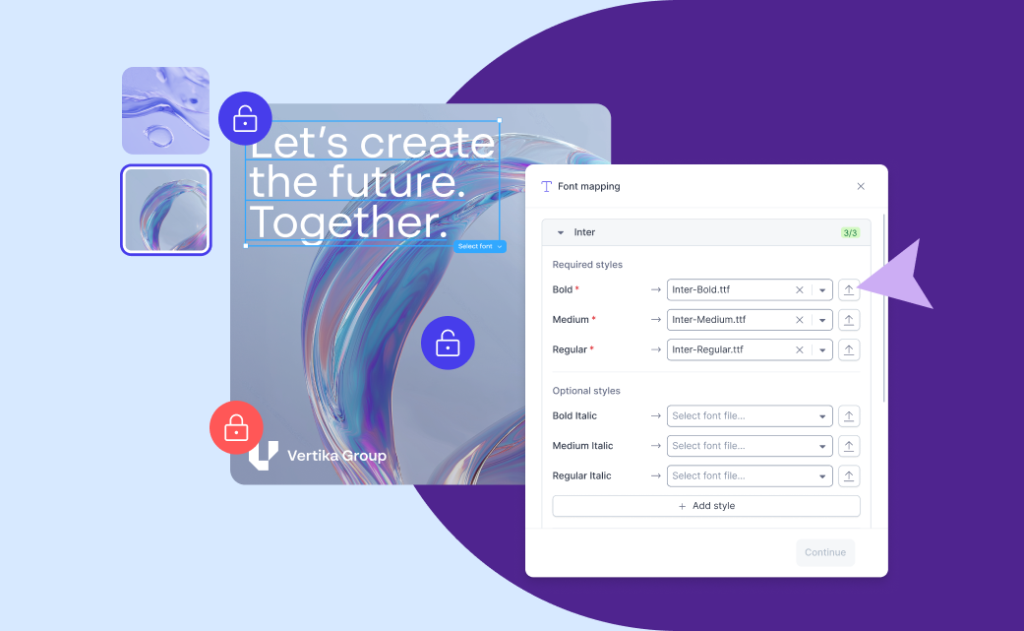
The administrator retains full control over what’s locked versus editable, what asset to use in the template, and who can access each template. That combination — creative freedom inside firm brand rules — is what makes local production safe. For a wider view of enabling non-designers, see how Papirfly helps empower frontline employees to create content.
Who buys it, who runs it, and who wins
The buyer is typically the Director of Brand or CMO — accountable for brand consistency at scale and for the cost of design bottlenecks. The template administrator, often a marketing operations owner, runs the day-to-day: plugin access, locking, and approvals. The design lead keeps working in Figma, reusing existing files rather than rebuilding elsewhere.
The people who win most are the field teams and the enterprise as a whole. Local markets launch faster, HQ reclaims time lost to adaptation requests, and the brand shows up consistently across retail, banking, energy, automotive, healthcare, and every other multi-market operation.
Conclusion
Figma changed how enterprises design. Papirfly’s Figma Design Templates change who gets to use that design — extending it from a central team to every field team that needs to move fast and stay on-brand.
The result is measurable: less off-brand content, faster local execution, and design talent freed from repetitive requests. For brand leaders and marketing operations owners managing localization across regions, that’s the difference between guidelines that exist and guidelines that get followed.
Figma Design Templates are currently in beta with pilot customers, with a wider rollout planned for later in Q3. Reach out to your Papirfly contact to join the waiting list and get involved early.
FAQs
What are Figma Design Templates in Papirfly?
They are editable, on-brand templates created by importing a Figma design into Papirfly’s Produce tool. A central team designs once, and field teams adapt copy, images, and colors within locked brand rules — no design skills required.
How long does it take to turn a Figma file into a usable template?
What used to take weeks of consultation can now be done in a matter of hours or less. A designer exports the file through the Papirfly plugin, an administrator maps fonts and sets locking rules, and the template is ready for field teams to use.
Do field teams need to know how to use Figma?
No. The Figma work happens once, at HQ or with an agency. Field teams only interact with the finished template in Papirfly’s launcher, where editing is as simple as filling in the fields the administrator has unlocked.
Can administrators control what field teams are allowed to change?
Yes. The template administrator decides exactly which elements are locked and which are editable, and sets permissions for who can access each template — so local teams get creative freedom without any risk of breaking the brand.
When will Figma Design Templates be generally available?
The capability is in beta with pilot customers now, with a wider rollout planned for later in Q3 2026. Contact your Papirfly representative to join the waiting list.